How To Search By Image On Google Chrome Android

Imagine you're out and about, and you spot a pair of shoes that you just can't stop thinking about. You want to know more about them, like where to buy them or how much they c...
Imagine you're out and about, and you spot a pair of shoes that you just can't stop thinking about. You want to know more about them, like where to buy them or how much they cost. That's where reverse image search comes in - a game-changer for curious minds like yours, and it's incredibly easy to do on your Google Chrome Android.
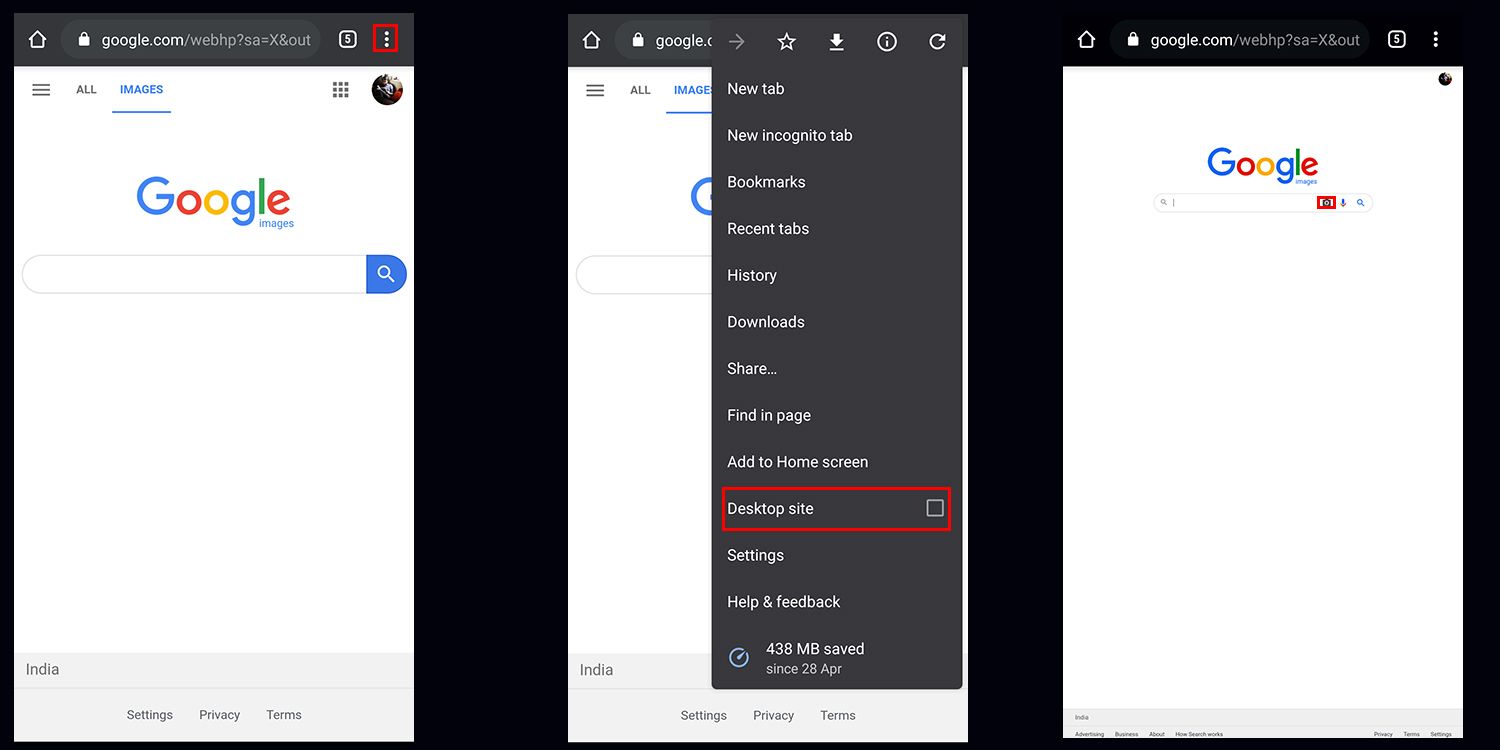
So, what is reverse image search? Simply put, it's a way to search the internet using an image instead of words. Think of it like showing a picture to a friend and asking "what's this?", and the friend responds with all the information you need. To try it out, open Google Chrome on your Android device, and navigate to the Google Images website.
Getting Started
To search by image, tap the three dots on the top right corner of the Google Chrome browser, and then select Desktop site. This will give you the full desktop version of the Google Images website, which includes the camera icon you need to upload or take a photo for your reverse image search. Don't worry, it's easier than it sounds!
Must Read
Now, tap the camera icon in the search bar, and you'll be given two options: Upload an image or Take a photo. Choose the one that suits your needs - if you've already got a picture of those shoes on your phone, upload it; if you're still out shopping, take a quick snap. Either way, Google will do the rest, searching the internet for matching images and giving you all the info you need.
Why It Matters
In today's world, we're constantly coming across things that pique our interest, whether it's a tasty-looking dish on social media, a funky piece of furniture in a friend's house, or even a beautiful landmark on our travels. With reverse image search on Google Chrome Android, you can satisfy your curiosity and learn more about the things that catch your eye. It's like having a personal assistant in your pocket, ready to give you the lowdown on anything you want to know.
Another great use for reverse image search is shopping. Let's say you see a friend wearing a cool t-shirt, and you want to get one just like it. Just take a photo of the tee, upload it to Google Images, and voilà - you'll get a list of matching results, including where to buy it and how much it costs. It's fast, easy, and super convenient.
 How to Delete Recent Searches on Google in Android - H2S Media
So, next time you're out and about, and you spot something that grabs your attention, don't just wonder what it is - find out! With reverse image search on Google Chrome Android, the answers are just a tap away. Whether you're a curious shopper, a foodie, or just someone who loves to learn new things, this feature is sure to become your new best friend.
And the best part? It's not just limited to products or places - you can use reverse image search to identify plants, learn about art, or even find similar images to inspire your next creative project. The possibilities are endless, and it's all at your fingertips with Google Chrome Android.
In conclusion, reverse image search is an amazing tool that can help you discover new things, learn more about the world around you, and even make your shopping experiences easier and more enjoyable. So, go ahead, give it a try, and see what fascinating facts and surprises you can uncover with just a few taps on your Google Chrome Android!
